Plasma tables
Torch, THC and cut-chart tools, plus guides for each manufacturer.
TableCAD is CAD/CAM software for plasma CNC tables and waterjets. Design parts and prepare cuts in one Windows program—from the first drawing to the handoff to your machine. Find your manufacturer’s guide to confirm the right output for your controller.
Free · Pro $249 · Extreme $495 · Ultimate $995
Paid tiers: one-time prices in USD. Features vary by tier.
Torch, THC and cut-chart tools, plus guides for each manufacturer.
Draw parts and plan cuts for supported waterjet makers.
From mounting plates and brackets to custom multi-part projects, TableCAD brings drawing and cut preparation together. Build your design, arrange the parts, and use its CAM tools to plan cut order and preview the toolpaths before exporting for your machine.
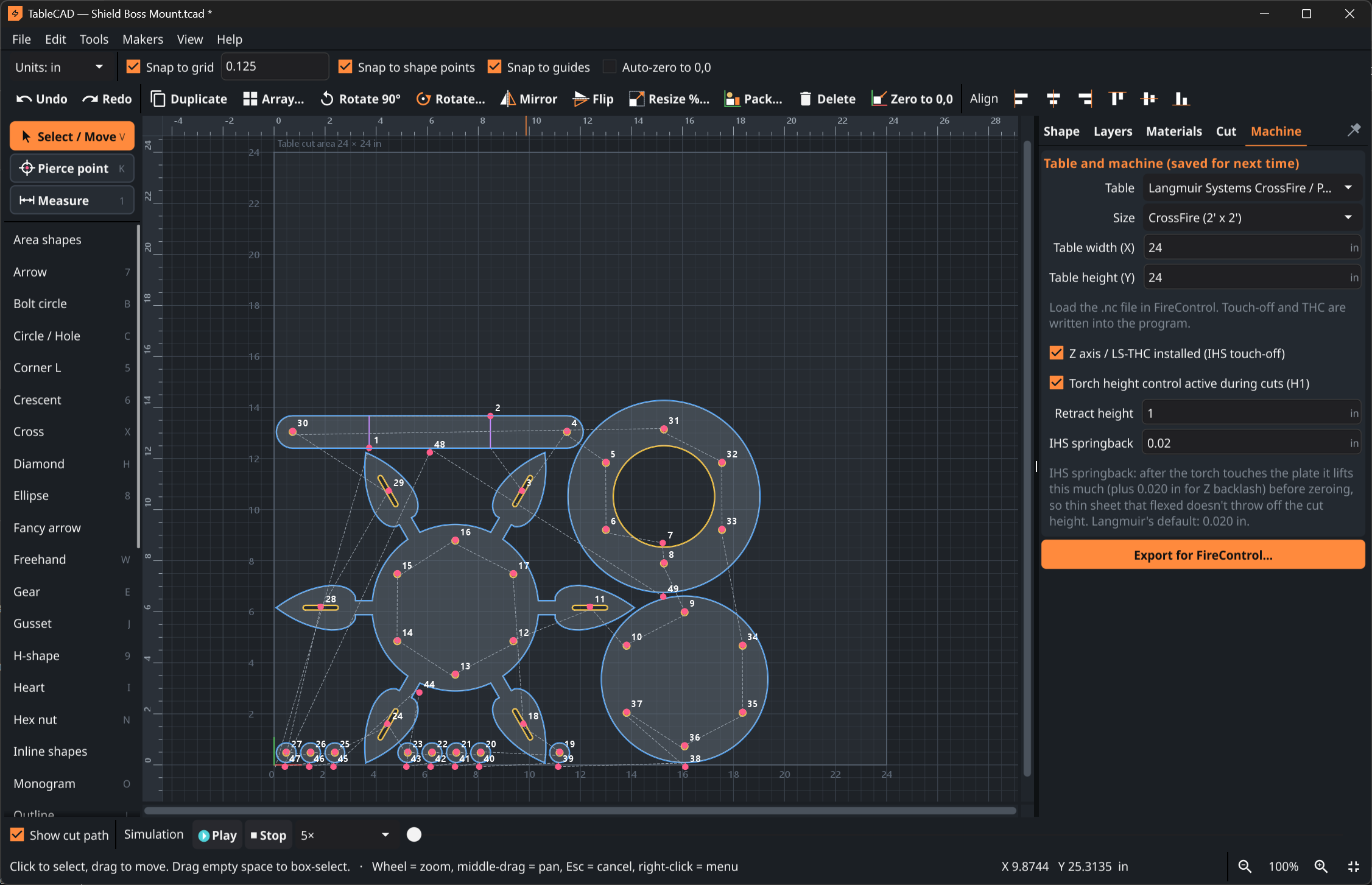
Draw the part and plan the cut in one Windows program, then hand off to the software that runs your machine.
Separate tools
Several programs, several handoffs.
The TableCAD way
Your controller software still loads and validates the file. Manufacturer guides explain each handoff.
Practical tools for cleaner parts, easier drawing and a more direct path to the machine. Features vary by tier; compare included features. Looking for kits? See the maker libraries.
For plasma cutting, spiral-center torch starts begin in scrap. That helps keep a divot or nub away from the edge and inside of your part.
Extreme adds text, gussets, gears, 4 bolt group cuts and object-point editing to all Pro features. Adjust and arrange the design without a detour into a separate CAD app.
Ultimate includes monograms: build one-piece split-letter signs from A to Z, add a name bar and ornamental text, then export the complete alphabet as DXF in one click.
Draw, import DXF, and use layers and image tracing for plasma tables and supported waterjets. Compatibility is confirmed per manufacturer, not as a tested model-by-model matrix.
For plasma cutting, watch the cut simulation, adjust playback speed, review the live G-code and check estimated cut time and cut length before sending the file to your table.
TableCAD brings CAD design and CAM cut-path preparation together, then prepares your job for a supported plasma table or waterjet. Export DXF, or use TableCAD output only after its format is verified for your controller. Validate every file in your machine software before cutting. Torch, THC and cut-chart items are plasma-only.
This is a product overview, not a feature list for every tier. Confirm included tools on the four-tier pricing page. Extreme includes all Pro features, Ultimate includes all Extreme features, and Free is listed with basic features only.
Included features vary by tier. Free is listed with basic features only.
All Pro features plus:
All Extreme features plus:
Go beyond individual parts. Maker Libraries are add-on modules that build project kits—from personalized signs and lawn art to off-road parts and shop tools.
Maker Libraries details and videos
Maker Libraries expand TableCAD with kit-building modules. This showcase does not specify module pricing or tier requirements.
For built-in tools—including Ultimate’s monogram features—compare the Free, Pro, Extreme and Ultimate tiers.
If a compatible plasma table or waterjet is in your shop, TableCAD is built around the work you want to get done with it.
Turn weekend projects into cut-ready parts without a CAD/CAM learning project.
Make brackets, repairs and one-off parts when the job calls for them.
Build signs and monograms with shape and text tools made for cutting.
Keep design and cut planning together for everyday jobs and prototypes.
See how TableCAD fits into your shop's drawing, cut planning, and machine-control workflow—with practical guidance for each plasma manufacturer. Waterjet guides are here.
Machine software versus height sensing
Read the guideDesign and cut planning for ArcLight tables
Read the guideEveryday parts and revision control
Read the guideModular hardware, separated roles
Read the guideTableCAD is Windows CAD/CAM software for plasma tables and waterjets from the manufacturers listed here. Set up your machine settings, then get back to making parts.
We’ll share customer experiences once there are real reviews to share.
Customer reviews will appear here after they’ve been collected and approved.
Testimonials placeholder · no reviews published yetStart with Free basic features, or compare the three paid tiers. Paid tiers are one-time purchases in US dollars, not subscriptions.
Every purchase is covered by our 30-day money-back satisfaction guarantee.
Compare the full tier details before choosing.
Compare tiersClear answers about the workflow, the shop PC and the machine. Features vary by tier; compare pricing and included features.
One Windows program from part idea to a file for your plasma table or waterjet workflow.


